Overview
Course Welcome notifications can be sent either:
- Immediately when a learner is enrolled.
- At a specific future date and time chosen by the Program Manager
This allows learners to be enrolled in advance while giving Program Managers control over when enrolment notifications are delivered.
Program Managers select the preferred notification timing as part of course setup.
Configure Welcome Notification Delivery
1. Navigate to the "Schedule & emails" tab
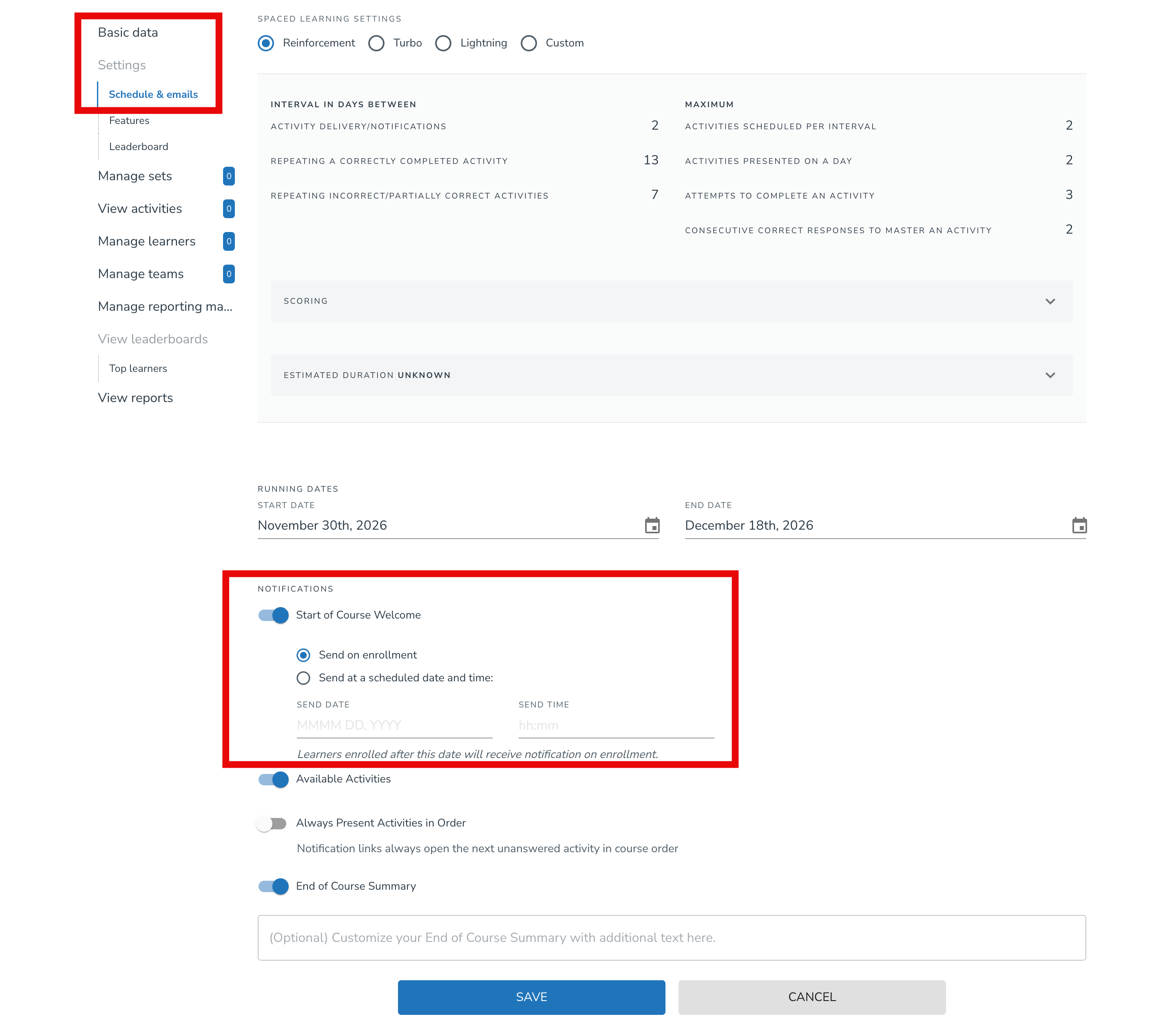
2. Choose When Welcome Notifications Are Sent
Under Start of Course Welcome, select one of the following options:
Send on enrolment
The Welcome notification is sent immediately when a learner is enrolled.
Note: This is the default setting.
Send at a scheduled date and time
The Welcome notification is sent at a future date and time specified by the Program Manager.
3. Select a Date and Time
When Send at a scheduled date and time is selected:
- A future date and time must be specified.
- The selected date and time is based on the company location/timezone.
- There is no default scheduled date or time.
How Scheduled Welcome Notifications Are Delivered
Once scheduled, Welcome notifications are delivered to enrolled learners at the selected date and time.
To prevent notifications being received outside normal working hours:
- Notifications are delivered according to each learner's local timezone.
- Learner-specific working days and working hours are respected.
- Vacation Hold settings are respected.
Notification Exceptions and Delays
The same notification-delay rules used for Available Activity notifications also apply to Welcome notifications.
| Scenario | Notification Behaviour |
|---|---|
| Vacation Hold active | Sent on the next working day after Vacation Hold ends |
| Learner has custom working days | Learner settings are respected |
| Learner has custom working hours | Learner settings are respected |
| Learner is suspended | Sent when the learner is reactivated |
| Course is suspended | Sent when the course is reactivated |
Learners Enrolled After the Scheduled Send Time
If a learner is enrolled after the scheduled Welcome notification date and time has passed, they receive the Welcome notification immediately upon enrolment.
Example
- Welcome notification scheduled for 1 December at 9:00 AM.
- A learner is enrolled on 5 December.
- The learner receives the Welcome notification immediately when enrolled.
Re-enrolment Behaviour
If a learner:
- Receives a Welcome notification;
- Is unenrolled from the course; and
- Is later re-enrolled;
they may receive an additional Welcome notification.